I have been working with Studiometry for a couple of months and everything is falling into place nicely however once a month I have to total all the items that I charged sales tax so I can file online. I have spent way too much time trying to construct a fast and easy report that will just show one month of sales tax charges. Note: I need the report to show just the items that had sales tax applied, not the sales tax collected. When I do my sales tax on line I enter the total amount of taxable items then the site figures the amount that I have to pay. Suggestions appreciated.
Date
Votes
5 comments
-

Oranged Support You might want to check out the Window menu > Accounting Window > Tax Reports. From there you can export a report based on the work items for a specific period.
-

mpphoto That works great to get the total of taxes applied to the items, but it does not show the total of taxable items. Even if I could get a report just showing the all things billed in a month listed in separate items it would work for me because I know the items that are taxable.
-

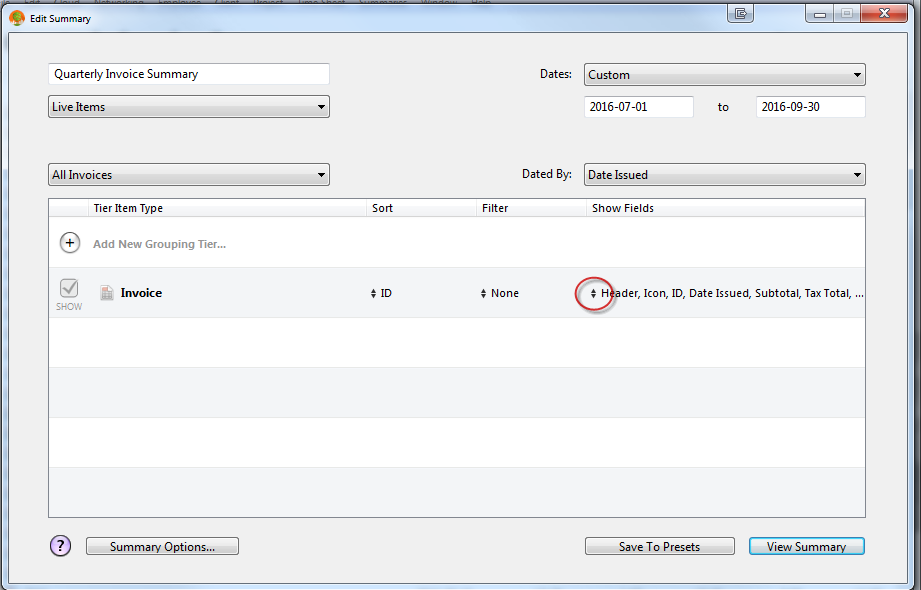
Rob Sherrard - Imageer I found that Accounting Window>Tax Reports gave anomalous results. I use a custom Summary created in the Summaries tab. My location requires Quarterly Tas returns, so the report in the screen shot is titled Quarterly Invoice Summary. However the range of transactions reported is governed by the Dates entered in the date selection boxes. If you click on the up/down arrow circled in the screen shot, you obtain a dialog which allows selection of the data covered by your report. My report is customized by placing check marks next to Header, Icon, Date Issued, Subtotal, Tax Total, Taxable, Non-Taxable and Amount. When the report runs it shows all the invoices in the selected period with the taxable, non-taxable, and taxes calculated. At the bottom of the report is a totalization of all the individual invoices. This gives me all the data I need to file the tax report online.
As is with your taxing agency, mine asks for online input and then comes back with the amount owed. The Tax Total summation given by this report gives a handy crosscheck of the taxing agency's calculation.
-
mpphoto Thanks Rob, that works for me. I clicked the same exact boxes and it may give me a little more info than I really need, but it is saved as a preset and I think I'm set. This should take care of me for the foreseeable future.
-
Rob Sherrard - Imageer If some of the columns are unnecessary for your needs, just leave the boxes unchecked for the ones you don't want.
Please sign in to leave a comment.