Every time I opened Studiometry a red reminder dot would appear with the number of overdue invoices in it. That no longer shows up and I can't figure out what I may have done to deactivate it. How do I get it back?
Date
Votes
3 comments
-

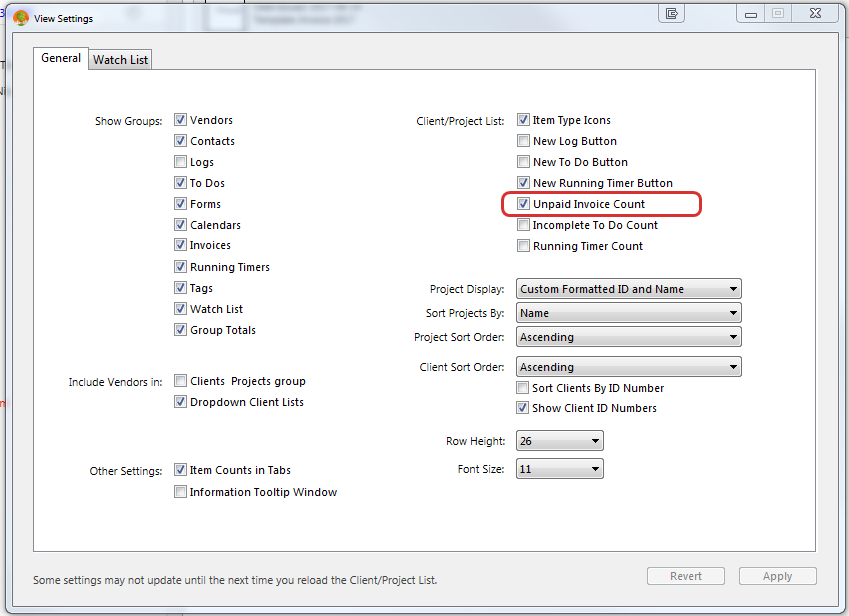
Rob Sherrard - Imageer Click on the Gear icon at bottom left of your screen. Choose View Settings in the popup list box. Place a check mark in Unpaid Invoice Count
-

Oranged Support It could also be related to your notification settings. If by red dot you mean the number in the bottom left of Studiometry that opens your notifications window, you can change your notification settings via the notifications window (Command-1 or Control-1), then clicking Options > Notification Settings. Make sure that on the right under Globals you have Invoices: Alerts checked.
-

mpphoto Yes, it was a red circle, bottom left with a number in it. Clicking it would display all invoices that are past due. It disappeared somehow.
I tried your suggestion above, but it gives me an error message saying that it cannot find the selected employee in this database...? I don't know what that means in this context.
Please sign in to leave a comment.