Can someone please tell me what the Mode column in Blueprints denotes? I have several blueprints that have an "X" in the Mode field
Date
Votes
3 comments
-

Oranged Support It's the same as non-blueprint items. The Mode can be Billable, Non-Billable, Estimated, or Purchase Order. For billable items, if you check the "Has Been Paid" checkbox then the item will be marked as paid.
You can change your blueprint to uncheck the Has Been Paid checkbox so that it will not default to paid, but basically however you setup your blueprint is exactly how the work item will be created.
-

Robert Rabner Thanks for the quick reply. I thought that might be the answer, however I must be doing something wrong. When I bring up a blueprint that I previously made from a work item (that apparently had been set as paid), I don't have the option to check or uncheck a "this time has been paid" I've included several screen grabs that I hope show that I am trying to convey.
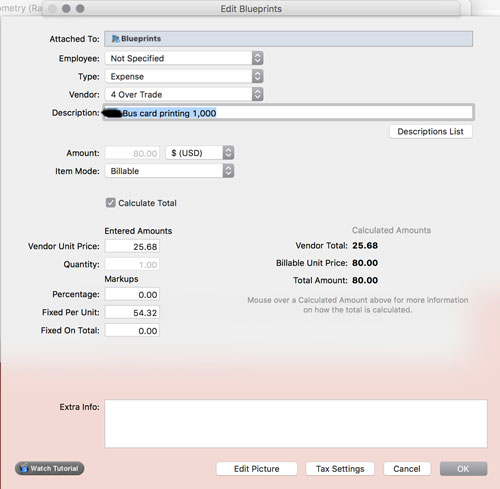
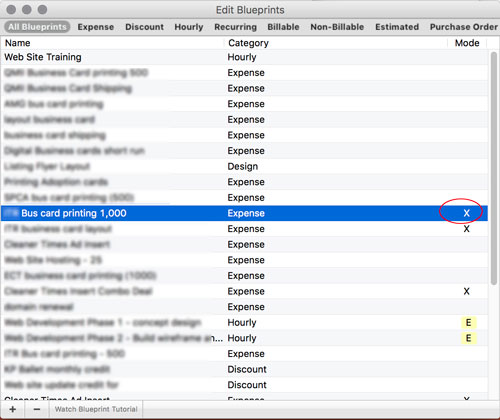
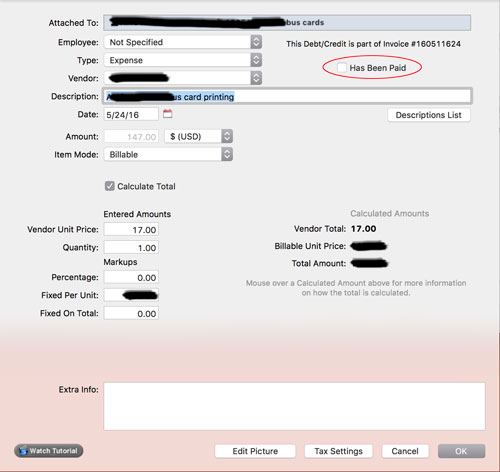
as you can see from the image blueprint created ... it does not give me the option to change it's status from paid (denoted by the X in the blueprint list) -
Oranged Support You're right, we'll look into allowing that to be changed on blueprints for the next update.
Please sign in to leave a comment.